Pages

Showing posts with label IPv6. Show all posts

6over4 Tunnels Configuration - (Mechanisms of transition from IPv4 to IPv6)

One of the most common mechanisms for testing IPv6 network interconnection, are 6over4 tunnels, which are used to encapsulate IPv6 packets in IPv4 native network, creating a peer to peer network between two machines that are communicating by this protocol .

Normally an IPv6/IPv4 node, or dual stack, in order to communicate with another computer through an IPv4 network, you need a tunnel interface, in which IPv6 addresses are configured as shown in the graph.

Tunne IPv4

6over4 Tunnels Configuration

Configure the tunnel 6over4 is in principle a relatively simple task, the configuration is similar to that performed in a GRE tunnel

For configuration, you must define the start and destination addresses on both computers, in some cisco equipment does not allow defining the start address, so they can define the start of the tunnel through the interface with local public IPv4 address. To 6over4 tunnel configuration is not necessary to define an IPv4 address.

Router1#configure terminal 
Router1(config)#interface Tunnel10
Router1(config)# ipv6 address 2800:100:101::1/64
Router1(config-if)#tunnel source 154.54.6.5
Router1(config-if)#tunnel destination 206.167.13.198
Router1(config-if)#tunnel mode ipv6ip
Router1(config-if)#end
Router1#

On Router 2, you must create another tunnel interface, as Router 1, and associate the source and destination addresses.

Router2#configure terminal 
Router2(config)#interface Tunnel20
Router1(config)# ipv6 address 2800:100:101::2/64
Router2(config-if)#tunnel source 206.167.13.198
Router2(config-if)#tunnel destination 154.54.6.5
Router1(config-if)#tunnel mode ipv6ip
Router2(config-if)#end
Router2#

As discussed above in some cases the equipment can not define the starting IP address, so you will need to specify the start of the tunnel with the physical interface name, for our example, will the interface f0/0, the command will be the following: "Router2 (config-if) # tunnel source int f0/0".

At the end of these configurations, the resulting topology will be as shown in the graph below, with an interface Tunnel10 in router1, connected with a direct cable to Tunnel20 interface on Router 2 and allow the simulation of having a link dedicated to communicate via IPv6, this is a simple way to interconnect their networks for IPv6 testing.

Tunnel for IPv6

Routing traffic through the tunnel 6over4

The next step now will allow routing from network 2800:20:20 :: 0/64 with the network 2800:10:10 :: 0/64. This is very simple, just simply turn on IPv6 routing and then add a route to reach the other network, the commands needed are:

Router1(config)#ipv6 route 2800:10:10::/64 2800:100:10::2
Router1(config)#ipv6 unicas-routing
Router2(config)#ipv6 route 2800:10:10::/64 2800:100:10::1
Router2(config)#ipv6 unicas-routing

Read more

IPv6 features

IPv6 is the new version of the IP protocol. IPv6 has been designed by the IETF to gradually replace IPv4 protocol. In this version, some features have remained above protocol, and have removed some functions that are used infrequently.

Main features of IPv6

*Larger address space. The IP address size changes from 32 bits to 128 bits, to support: more levels of addressing hierarchy and more addressable nodes.

*Header Format Simplification. Some IPv4 header fields are removed or made optional

*Efficient and extensible IP packets, with no fragmentation at routers, aligned to 64 bits and a fixed-length header, simplest, which speeds up its processing by the router.

*Possibility packet payload (data) greater than 65,355 bytes.

*Core security protocol (IPsec). IPsec support is a requirement of IPv6.

*Capacity flow labels. IPv6 can be used by a source node for tagging packets belonging to a particular traffic flow, which require special handling by the IPv6 routers, such as non-QoS default or real time services. For example video conferencing.

*Autoconfiguration: address autoconfiguration is simpler, the upper 64 bits are set by a message from the router (Router Advertisement) and the lower 64 bits are obtained with the MAC address (EUI-64 format). In this case, the length of the subnet prefix is 64, so no need to worry more about the network mask.

*Renumbering and "multihoming": facilitating change service provider.

*Mobility characteristics, the possibility that a node keeps the same IP address, despite their mobility.

*More efficient routing backbone network because the addressing hierarchy based on aggregation.

*Quality of Service (QoS) and Class of Service (CoS).

*Authentication and Privacy Capabilities


IPv6 Addressing

The addresses are 128 bits and identify individual interfaces, or sets of interfaces. As in IPv4, the nodes are assigned to interfaces.

They are classified into three types:
  • Unicast: identify a single interface. A packet sent to a unicast address is delivered only to the interface identified by that address. [RFC 2373] [RFC 2374]
  • Anycast: identify a set of interfaces. A packet sent to an anycast address will be delivered to any of the interfaces identified by the address of the set to which belongs the anycast address. [RFC 2526]
  • Multicast: identify a group of interfaces. When a packet is sent to a multicast address is delivered to all interfaces identified by that address group.
In IPv6, there are no broadcast addresses, its functionality has been improved by multicast addresses. [RFC 2375]


Representation of IPv6 Addresses

There are three ways of representing IPv6 addresses as text strings.
  • x:x:x:x:x:x:x:x where each x is a hexadecimal value of 16 bits, each of the 8 fields that define the direction. It is not necessary to write the leading zeros in each field, but at least there should be a number in each field.
Examples:

FEDC:BA98:7654:3210:FEDC:BA98:7654:3210
1080:0:0:0:8:800:200C:417A
  • As is common with addressing schemes using long strings of bits to zero, the possibility to use to represent syntactically ::. Use :: indicates one or more groups of 16 bits of zeros. This symbol may appear only once in each direction.
Examples:
1080:0:0:0:8:800:200C:417A unicast address
FF01:0:0:0:0:0:0:101 multicast address
0:0:0:0:0:0:0:1 loopback address
0:0:0:0:0:0:0:0 unspecified addresses

may be represented as:
1080::8:800:200C:417A unicast address
FF01::101 multicast address
::1 loopback address
:: unspecified addresses

For scenarios with IPv4 and IPv6 nodes can use the following syntax:

x:x:x:x:x:x:d.d.d.d, where x represent hexadecimal values ​​of the six most significant parts (16 bits each) that make up the direction and d are decimal values ​​of the four least significant parts (of 8 bits each), standard representation IPv4 address format.

Examples:
0:0:0:0:0:0:13.1.68.3
0:0:0:0:0:FFFF:129.144.52.38

or in compressed form:
::13.1.68.3
::FFFF:129.144.52.38


Representing address prefixes

Identifiers prefixes subnets, routers and IPv6 address ranges are expressed in the same way as in CIDR notation used in IPv4.

An IPv6 address prefix is represented by the following notation:

address-ipv6/length-prefix, which

address-ipv6: is an IPv6 address in either of the above notations.
length-prefix: is a decimal value specifying how many of the most significant bits represent the address prefix.


Global Unicast Address

Format Global unicast addresses

Global Unicast

Global routing prefix: a prefix assigned to a site, generally is structured hierarchically by the RIRs and ISPs.
Subnet Identifier: the identifier of a subnet within a site. It is designed for site managers as hierarchically structured
Interface identifier: the identifier of an interface. In all unicast addresses, except those that start with binary value 000, the interface identifier must be 64 bits and be constructed in Modified EUI-64 format.

The format for this case is as follows:

Global Unicast - Interface identifier


Calculation of IPv6 address using the MAC

A MAC address set manually or by software should not be used to derive from it the interface identifier, but if no other formula, your property should be reflected in the value of bit U/L.

Calculate IPv6

DNS

The current storage Internet addresses in the Domain Name System (DNS) of IPv4 can not be easily extended to support 128-bit IPv6 addresses. This is because applications assume that address queries return only IPv4 addresses are 32-bit.

In order to store IPv6 addresses defined the following extensions (see RFC 3596)
  • A new type of record, the AAAA record. Used to store IPv6 addresses, because the extensions are designed to be compatible with existing DNS implementations.
  • A new domain to support lookups based on IPv6 addresses. This domain is IP6.ARPA.
  • Redefining existing queries that locate IPv4 addresses. For IPv6 addresses can also process.
The changes are designed to be compatible with existing software. Maintain support IPv4 addresses.

Read more

IPv4 to IPv6 - Basic Transition Mechanisms

The total Internet transition from IPv4 to IPv6 in the short term is impossible, due to the size of the Internet and the large number of users currently using IPv4, so a certain time to make the full transition to IPv6 Internet is unthinkable.

However, there is no problem in that the transition is not carried out immediately, since both IPv4 and IPv6 protocols can coexist without any problem. Rather, it has been thought that this transition should be done gradually and efficiently, where in the initial phase nodes have support for both protocols simultaneously, then over time, have an IPv6 Internet infrastructure and leaving on one hand the protocol IPv4.

Likewise these transition mechanisms are designed to be used by IPv6 hosts and routers that need to interoperate with IPv4 hosts and utilize IPv4 routing infrastructures. Many nodes are expected to need support for a long time and perhaps indefinitely. However, IPv6 can also be used in environments which do not require interoperability with IPv4. Nodes designed for such environments need not use or implement these mechanisms.

The goals of the transition of the Internet from IPv4 to IPv6 are:
  • The coexistence of IPv4 and IPv6, IPv4 completely disappear until sometime.
  • The use of hosts and routers with IPv6 support must be distributed over the Internet in a way thatis simple and progressive.
  • Reducing interdependencies during the transition.
  • The transition to network administrators and end users should be easy to implement.
  • Dual Stack Transition Mechanism
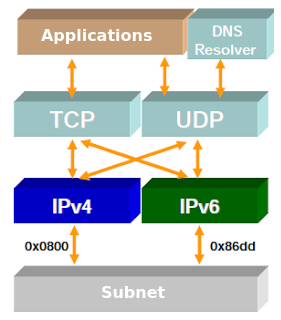
  • The most obvious way, so that a node can communicate with nodes that use only IPv4 or only IPv6, is the simultaneous use of both protocols that node, in separate stacks, a node with either protocol can send and receive data from other nodes regardless of the protocol version support such nodes.
Dual Stack - Transition Mechanisms IPv4 to IPv6

Nodes with both protocol stacks are called IPv6/IPv4 nodes. By using this mechanism double stacks, will have an address in each stack. These IPv4 and IPv6 addresses can that are related among themselves, but not required to implement this method, so these directions may not have any relationship.

To obtain the IPv6 address, the nodes can use stateless autoconfiguration mechanisms or by DHCPv6, and to obtain the IPv4 address, you can use the standard mechanisms or protocols as DHCPv4, boot protocol (BOOTP), Resolution Address Reverse Protocol (RARP) or manual configuration on the node of the IPv4 address.

For these IPv4 and IPv6 are related in some way within each node, you can make use of IPv6 addresses that are compatible with IPv4. An address of this type is in its high-order 96 bits (those on the left) a value of 0:0:0:0:0:0 and the low-order 32 bits (those on the right) an IPv4 . Thus, when used, it could have on the IPv6 stack, the address includes the 96-bit value 0:0:0:0:0:0 more IPv4 address, and the IPv4 stack would address IPv4 is in the lower order 32 bits of the IPv6 address.

Read more