Assigning external IP address pool using dynamic NAT
In some cases, when you have more than one public IP address you may want to use dynamic allocation thereof to the local network computers can connect to the Internet. This is accomplished by configuring an IP address pool on the router that performs NAT.
The commands needed for this configuration are described below:
General configuration of NAT and public address pool
Configuring the interface f0/0 (Internet)
Configuring the interface f0/1 (Internal LAN)
This is similar to the configuration required for a dynamic NAT with a single public IP address, with the only difference that it allows external devices to see more than one IP address on your network.
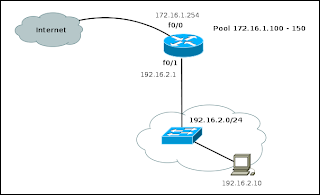
In the above commands, you can identify how you create the pool of public IP addresses and then how it is assigned to the NAT configuration line. In this case is no longer necessary overload keyword.
The commands needed for this configuration are described below:
General configuration of NAT and public address pool
Router#configure terminal
Router(config)#access-list 15 permit 192.168.2.0 0.0.0.255
Router(config)#ip nat pool NATPOOL 172.16.1.100 172.16.1.150 netmask 255.255.255.0
Router(config)#ip nat inside source list 15 pool NATPOOL
Configuring the interface f0/0 (Internet)
Router(config)#interface FastEthernet 0/0
Router(config-if)#ip address 172.16.1.254 255.255.255.0
Router(config-if)#ip nat outside
Router(config-if)#exit
Configuring the interface f0/1 (Internal LAN)
Router(config)#interface FastEthernet 0/1
Router(config-if)#ip address 192.168.2.1 255.255.255.0
Router(config-if)#ip nat inside
Router(config-if)#exit
This is similar to the configuration required for a dynamic NAT with a single public IP address, with the only difference that it allows external devices to see more than one IP address on your network.
Router(config)#ip nat pool NATPOOL 172.16.1.100 172.16.1.150 netmask 255.255.255.0
Router(config)#ip nat inside source list 15 pool NATPOOL
In the above commands, you can identify how you create the pool of public IP addresses and then how it is assigned to the NAT configuration line. In this case is no longer necessary overload keyword.

